What is a Port?
What is a Port?
A port:
Port is a physical docking point using which an external device can be connected to the computer. It can also be programmatic docking point through which information flows from a program to computer or over the internet.
Characteristics
A port has the following characteristics:
- External devices are connected to a computer using cables and ports.
- Ports are slots on the motherboard into which a cable of external device is plugged in.
- Examples of external devices attached via ports are mouse, keyboard, monitor, microphone, speakers etc.
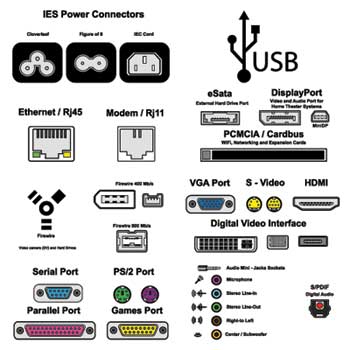
Following are few important types of ports:
Serial Port
- Used for external modems and older computer mouse
- Two versions : 9 pin, 25 pin model
- Data travels at 115 kilobits per second
Parallel Port
- Used for scanners and printers
- Also called printer port
- 25 pin model
- Also known as IEEE 1284-compliant Centronics port
- Used for old computer keyboard and mouse
- Also called mouse port
- Most of the old computers provide two PS/2 port, each for mouse and keyboard
- Also known as IEEE 1284-compliant Centronics port
Universal Serial Bus (or USB) Port
- It can connect all kinds of external USB devices such as external hard disk, printer, scanner, mouse, keyboard etc.
- It was introduced in 1997.
- Most of the computers provide two USB ports as minimum.
- Data travels at 12 megabits per seconds
- USB compliant devices can get power from a USB port
VGA Port
- Connects monitor to a computer's video card.
- Has 15 holes.
- Similar to serial port connector but serial port connector has pins, it has holes.
Power Connector
- Three-pronged plug
- Connects to the computer's power cable that plugs into a power bar or wall socket
Firewire Port
- Transfers large amount of data at very fast speed.
- Connects camcorders and video equipments to the computer
- Data travels at 400 to 800 megabits per seconds
- Invented by Apple
- Three variants : 4-Pin FireWire 400 connector, 6-Pin FireWire 400 connector and 9-Pin FireWire 800 connector
Modem Port
- Connects a PC's modem to the telephone network
Ethernet Port
- Connects to a network and high speed Internet.
- Connect network cable to a computer.
- This port resides on an Ethernet Card.
- Data travels at 10 megabits to 1000 megabits per seconds depending upon the network bandwidth.
Game Port
- Connect a joystick to a PC
- Now replaced by USB.
Digital Video Interface, DVI port
- Connects Flat panel LCD monitor to the computer's high end video graphic cards.
- Very popular among video card manufacturers.
Sockets
- Connect microphone, speakers to sound card of the computer

Comments
Post a Comment